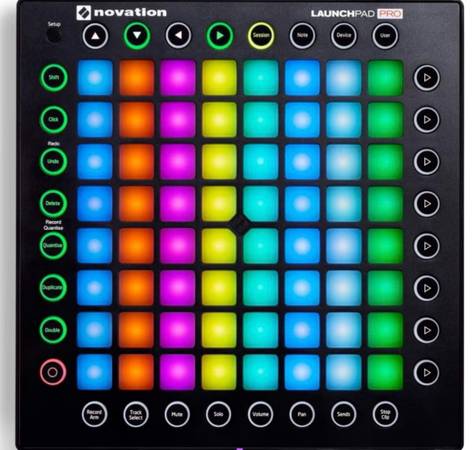
Solid, versatile MIDI Controller. Works perfectly and plays great! Original owner- Comes with the box and Novation orange USB cable.
In Glendale close to Burbank. Thanks!
—
The Novation Launchpad Pro MK2 is a professional-grade 64-pad MIDI grid controller designed for seamless, deep integration with Ableton Live, Logic Pro, and external hardware.
Key Features
• Velocity- and Pressure-Sensitive Pads: Features an 8x8 grid of RGB backlit pads that respond to how hard you strike them and support aftertouch for expressive performance.
• Four Core Performance Modes:
• Session Mode: Trigger and combine clips, launch scenes, and manage loops.
• Note Mode: Play the grid like an instrument with melodic layouts and automatic Scale Mode (locking notes to 32 keys/modes so you never play out of key).
• Device Mode: Control Ableton instruments and effects smoothly using the grid as vertical faders.
• User Mode & Max for Live: Build custom step sequencers, lights, or creative tools via Max for Live integration.
• Standalone MIDI Connectivity: Includes physical MIDI In, Out 1, Out 2/Thru ports to sequence and play external hardware synths (like a Novation Bass Station II) without needing a computer.
• Class-Compliant Plug-and-Play: Requires no driver installation on Mac or Windows; can be bus-powered via USB or plugged into an external power supply for maximum LED brightness.
—
Overview
Enhance your performance
Launchpad Pro is the best and simplest performance grid instrument for Ableton Live. It integrates seamlessly and simplifies the challenge of performing live in Ableton, by giving you hands-on control of your clips and tracks with four simple modes: Session, Note, Device and User. You don’t need to set anything up; simply plug in and starting playing your music - everything will just work
Control just about anything
Whichever software you’re using, Launchpad Pro lets you control it and any piece of external hardware. Plug it straight into Logic Pro and play it like a keyboard, or connect the MIDI ports to Bass Station II and play riffs on your grid. Immediately play your clips — the 8x8 grid of RGB pads light up to match the colour of your clips in Ableton, so you can concentrate on triggering and combining your loops and ideas.
Scale Mode
The pads automatically assign themselves to the notes of one of 32 keys and modes, making it impossible to play out of key.Make dynamic beats: drum racks are automatically laid out and illuminated, which makes it as easy as possible to create expressive beats and drum performances using the velocity and pressure-sensitive pads.
Play it like an instrument
You can easily play notes, scales and chords on the grid, because Launchpad Pro illuminates its pads in melodic layouts. You’ll get RGB LED feedback every time you press a pad and, if you’re in Standalone Mode, you can use the grid to play any of your software and external hardware, too.
Mix without losing focus
Get slick, immediate access to all your mixer controls mid-performance, so you stay in your flow. There’s no need to enter a separate mixer mode; press and hold a mixer function button (like mute or volume), make a change, and then simply release the button to drop straight back into your performance.
Easily control your effects
Control any Ableton effect or instrument mid-performance to add engaging, expressive effects like reverb, beat repeats and filters. The button grid turns into eight velocity-sensitive vertical faders, with LED feedback for super smooth effect transitions.
Build your own creations
Max for Live lets you use your Launchpad Pro however you like: turn it into a step sequencer, trigger videos from drum pads or use it to create just about anything you can imagine. Alternatively, engage with the whole community of Max for Live creators to find limitless inspiration and downloads.