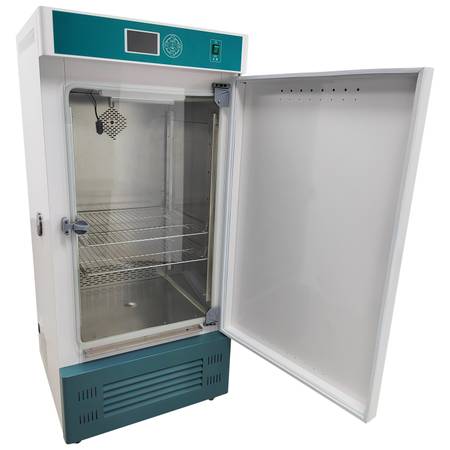
Product Overview
The constant temperature and humidity incubator can control the high and low temperature and humidity, and is used to simulate the environmental temperature and humidity. It is widely used in drug, textile, food processing, biological culture, physical analysis and other tests and various temperature and humidity tests of industrial products.
Product Parameters
Model HSP-250B
Power supply 220V 1PH
Power 1000W
Volume 250L
Temperature range 5-65˚C
Temperature resolution 0.1˚C
Humidity range 50-90%RH
Product size 71x70x154cm (27.9x27.5x60.6 inches)
Note: The above temperature and humidity parameters can be measured at the no-load temperature of 28℃ and humidity of 65%RH.
Attention
1. For the safety of the tests, please install the external grounding device, select the power supply matched with the equipment and install the leakage protection device.
2. It is strictly prohibited to use the equipment for the tests of inflammable, explosive, poisonous and strongly corrosive materials.
3. Place the equipment on the dry platform or ground, and keep it 50CM or above away from the wall.
4. Put the tested items on the tray as required, turn on the power, turn on the switch, and set the required temperature according to the operation instructions of the intelligent instrument.
5. Turn off the power when the equipment is not in use, and keep it dry and clean.
6. Please read the instruction of this product carefully before operation.
Product Features
1. The shell of the product is made of high-quality steel plates, the surface of the shell is firmly painted by electrostatic spraying, and the appearance is beautiful. The working chamber is made of high-quality stainless steel plates, so it is resistant to corrosion and aging. The periphery of the inner container adopts circular arc transition, and a toughened glass door is arranged inside the inner container.
2. The machine adopts the intelligent microcomputer LCD control system and has the functions of timing, alarm, over-temperature protection, etc. The 30 sections of temperature and humidity setting and automatic switching fulfill the function of simulating the environmental temperature and humidity.
3. The Brand compressor achieves fluorine-free and environmentally friendly refrigeration and breeze circulation to ensure uniform temperature inside the box.
4. Balanced control over cooling and heating ensures small temperature fluctuation and more accurate temperature control.
5. The independent glass front door observation window is transparent and beautiful, which is convenient to observe the changes of the items in the box. The magnetic rubber seal is used, and the door is easy to open and good in sealing performance.
6. Ultrasonic humidification is adopted, the humidification and temperature control are stable, the humidity fluctuation range is ±5-8℃RH, and the machine has a water shortage and power off function to prevent the machine from burnout due to water shortage.
7. The machine has multiple safety measures, such as compressor overheat protection and instrument failure protection, to ensure the safety of the tests.
8. The functions of printer, 485 interface, U disk storage, SMS alarm and so on can be additionally set.
Operation Method
1. Overview
The controller adopts the temperature self-adaptive control technology for temperature control, and can be used to simulate the natural environment (temperature and humidity).
The power supply of the humidifier must be connected to the humidifier socket at the bottom of the left side of the box body. The humidifier shall be connected to the left side of the box body with a hose. Humidification shall start when the temperature reaches the set temperature. The humidifying function does not start when the temperature rises for the first time.
2. Functional specifications
The system will return to the main page without operation within 30s. The buzzer will ring for 30s after the operation ends. When the buzzer rings, click any key to silence the sound.
3. Set the state
Turn on the power switch for about 3 seconds, the machine can normally display the temperature. The corresponding window of SV displays end, long press the "increase" key for about 2 seconds, and the machine will normally operate.
On the page of machine operation, click "Set key" to enter the setting state of cycle and number of segments. The set value of cycle flashes and can be modified by the "increase key" or "reduce key" (the cycle is generally set to 0 cycle). Press the "Set key" again, and the set value of the number of segments flashes and can be modified by the "increase key" or the "reduce key". Press the "Set key" again to enter the setting state of each period of time, temperature and humidity, and the corresponding value can also be modified by the "increase key" or "reduce key". After setting the corresponding period, number of segments, temperature, humidity and time, click the set key to save and exit, and then the machine starts to run.
In the setting state, click the return key to return to the setting of the previous parameter, and the selected parameter value will flash and be displayed. Short press the exit or set key to exit the setting state, save parameters and power failure memory.
Note: One cycle means that the controller runs from the first segment to the Nth segment (the number of segments required by the customer) for one cycle. When the cycle is set to 0, it means that the controller is located in the continuous working state.
Item Number (148091): 1 x Constant Temperature and Humidity Incubator 250L 220V