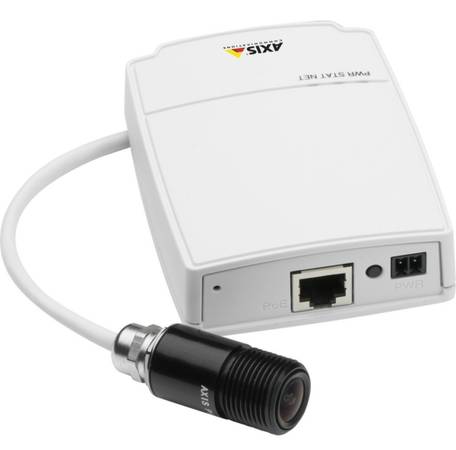
AXIS P1214-E Discreet, High-Performance Outdoor/Indoor Network Security Camera
MSRP/Retail Value: $500++
Up for sale is a premium, high-performance AXIS P1214-E modular network security camera system. Because of its split-unit, hidden design, this industrial-grade system is heavily trusted and frequently used for high-security applications like ATMs, banking kiosks, and highly discreet entryways.
How the System Works:
The Sensor Unit (The Camera Lens): Rated for both Indoor and Outdoor use. It features a miniature, highly covert lens attached to a long 8-meter data cable.
The Main Unit (The Brains): Designed for Indoor ONLY placement. This hidden processor unit handles all the heavy lifting:
Video Processing: Compresses raw footage into bandwidth-saving H.264 streaming formats for seamless network viewing.
Power Delivery: Houses the Power over Ethernet (PoE) circuitry as well as DC terminal block connections.
Local Storage: Built-in microSD card slot allows you to record and store high-definition video directly inside the device without needing an external NVR.
Onboard Analytics: Handles intelligent motion detection and active tampering alarms (alerts you instantly if someone blocks or covers the lens).
🔧 Freshly Reset & Ready for Deployment
The system was used. It can be reset in one of the following options or both. Please follow these quick steps:
Hardware Reset (Control Button):
- Disconnect power from the main unit.
- Press and hold the Control button on the main unit.
- Reconnect the power while continuing to hold the button.
- Hold the button for approximately 15 to 30 seconds until the status LED indicator flashes amber.
- Release the button.
- Wait up to 1 minute for the status LED to turn solid green, indicating the process is complete.
Web Interface Reset
- Open a web browser.
- Enter the camera’s IP address in the address bar.
- Navigate to Setup.
- Go to System Options.
- Open the Maintenance menu.
- Click Default to reset all settings completely.
- Alternatively, click Restore to reset most settings while keeping your current IP address.
Default Login Credentials
- The default username is root.
- You will be prompted to set a new password upon your first login.
- The default fallback IP address is 192.168.0.90 if no DHCP server is available on your network.
📦 What's Included in the Box:
(1) AXIS P1214 Main Unit (Processor Module)
(1) AXIS P1214-E Sensor Unit (Miniature lens housed in a white angled outdoor enclosure)
(1) Pre-mounted 8m (26 ft) Cable (Connects the sensor directly to the main unit)
(1) Main Unit Mounting Bracket (For wall or DIN rail mounting)
(1) Wall/Ceiling Mount Kit (Specialized brackets and hardware for flush or surface mounting)
Please Note: The physical installation guide is NOT included, but can be downloaded for free in seconds directly from the official Axis website.
🔐 AVHS Authentication Key Note:
Local Use (No Key Needed): If you intend to use this camera locally on your own network with software like AXIS Camera Station or a local Network Video Recorder (NVR), an AVHS key is NOT required.
Cloud Use: If you plan to deploy this on a cloud-hosted platform (like Genetec Stratocast), please contact your cloud provider using the system Serial Number (S/N: ACCC8E1F8633) to provision an AVHS key.
Box Dimensions: Approximately 9.5" L × 6.5" W × 2.5" D