**** BRAND NEW AUTHENTIC IN ORIGINAL SEALED PACKAGING ****
==================================================================================================
Kensington SD4800P USB-C 10Gbps Scalable Video Docking Station - 60W PD - DP/DP/HDMI - Windows - with 135W Adapter - SKU K38249NA
==================================================================================================
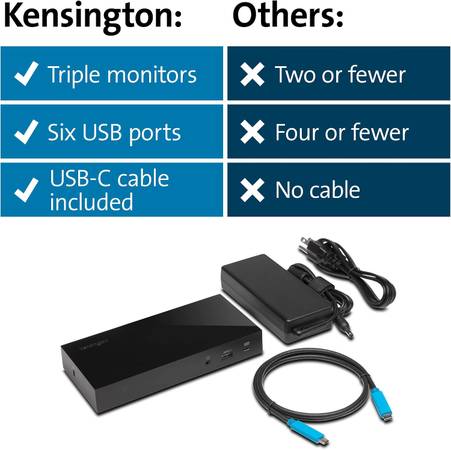
Let the leader in professional desktop performance make the most of your laptop’s USB-C connectivity with the ultimate driverless docking solution. Developed with scalability in mind, the SD4800P Universal USB-C Scalable Video Dock with Power Delivery provides users with dual video support today and triple 1080p video support for next gen DisplayPort 1.4 devices. A single USB-C cable connection not only powers your device, it transfers video, audio, and data at up to 10Gpbs, and connects up to three external displays –providing the ultimate plug and play docking experience with no driver installation required. It is an ideal docking solution for graphic and web designers, animators, engineers, financial analysts, and other environments supporting visual multitasking.
Best For: USB-C Laptops & Ultrabooks that support Power Delivery and Monitors that support up to 1080P
Connection Technology: USB-C Alt Mode
USB-C Power Delivery: Supports USB-C PD 3.0 (60W of laptop charging)
Compatibility: Windows 7 or above
# of Monitors Supported: 3
Video Ports: 1 x HDMI v2.0 and 2 x DisplayPort++
Maximum Resolution Supported Single Monitor: 3840 x 2160 @ 30Hz; Dual Monitors: 1920 x 1080 @ 60Hz; Triple Monitors: 1600 x 900 @ 60Hz (see manual for other supported resolutions)
Plug & Play: Installation without the need for drivers or downloads
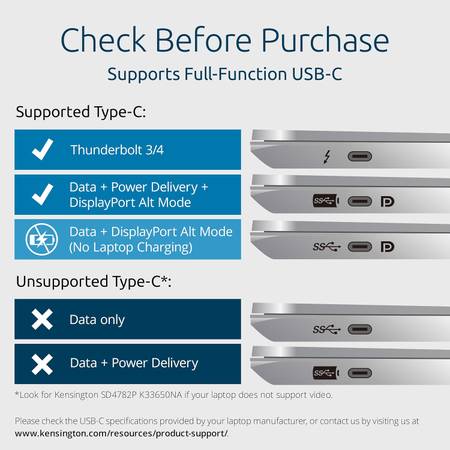
System Requirements: Host device must support Power Delivery and DisplayPort Alt Mode over USB-C
USB-C Driverless Dock – FAQ
~~~~~~~~~~~~~~~~~~~~~~~~
Q: Is this dock compatible with USB-C ports?
A: Yes, the dock works with computing devices (ex: laptops, 2-in-1’s, etc.) that have at least one available USB-C port.
Q: Does this docking station support device charging (i.e. will it charge my laptop)?
A: For USB-C that support Power Delivery, yes. Please check the specs of your laptop or reach out to us and we can help you identify if your USB-C port supports Power Delivery.
Q: What operating systems does this dock support?
A: Windows 7 or above
Q: Does this dock require software like DisplayLink?
A: No, this dock is plug and play, no software is required.
Q: Will this dock be compatible with computers that have a Thunderbolt 3 port?
A: Yes, the dock is compatible with a laptop that has a Thunderbolt 3 port, however, it will not deliver the maximum bandwidth of Thunderbolt 3 (40Gbps), but rather deliver what the dock supports (5Gbps or 10Gbps, depending on docking station).
Q: What if my device has a USB-C port but it doesn’t support DisplayPort Alt Mode?
A: Unfortunately, if your USB-C port doesn’t support Alt Mode, then you won’t receive video output.
Q: What if my device has a USB-C port but it doesn’t support Power Delivery (PD)?
A: The dock will work correctly with video and data (including audio and Ethernet), but the dock would not be able to supply charging to the target laptop.
Q: Does this dock support USB Power Delivery (PD)?
A: Yes, supports PD 3.0 (60W of laptop charging)
Q: How many monitors does the dock support and what is the maximum resolution supported?
A: Single Monitor: 3840 x 2160 @ 30Hz / Dual Monitors: 1920 x 1080 @ 60Hz / Triple Monitors: 1600 x 900 @ 60Hz (see manual for other supported resolutions)
Q: Does the dock support fast-charging for my phone?
A: Yes, the front USB Type-A port supports 5V/2.4A and the front USB-C port supports 5V/3A
Q: What is the maximum speed on the USB ports?
A: USB 3.1 Gen2 (10Gbps)
Q: What does the “2-Lane/4-Lane” switch under the dock do?
A: This gives the user the option to customize their dock settings for their potential needs. “2-Lane” offers dual 1080p with data transfer speeds up to 10Gbps and “4-Lane” offers dual 4k with data transfer speeds up to 480Mbps